<?xml version="1.0" encoding="utf-8"?><?xml-stylesheet type="text/xsl" href="atom.xsl"?>
<feed xmlns="http://www.w3.org/2005/Atom">
    <id>https://simpliplay.netlify.app/docs/blog</id>
    <title>SimpliPlay Blog</title>
    <updated>2026-10-24T00:00:00.000Z</updated>
    <generator>https://github.com/jpmonette/feed</generator>
    <link rel="alternate" href="https://simpliplay.netlify.app/docs/blog"/>
    <subtitle>SimpliPlay Blog</subtitle>
    <icon>https://simpliplay.netlify.app/docs/img/favicon.ico</icon>
    <entry>
        <title type="html"><![CDATA[Play Families, and eMudhra]]></title>
        <id>https://simpliplay.netlify.app/docs/blog/playfamiliesandemudhra</id>
        <link href="https://simpliplay.netlify.app/docs/blog/playfamiliesandemudhra"/>
        <updated>2026-10-24T00:00:00.000Z</updated>
        <summary type="html"><![CDATA[Welp, it turns out there was a reason I got those "policy violations".]]></summary>
        <content type="html"><![CDATA[<p>Welp, it turns out there was a reason I got those "policy violations".
It was the Play Families policy...
Plus, a certain company called eMudhra had a certificate compromise, that affected the desktop app.</p>
<p>When I was filling out the target age ranges for the app, I intended for it to be for general audiences.
So, I naturally just checked every age box they had. BUT, in doing this, I was forced to be compliant
with the Play Families policy.</p>
<p>My app didn't violate anything in the policy (and, the last 2 releases bound by it were approved).
But updates were PAINFULLY slow. What would take a few hours to go on the store for the 13+ age range I use now, took at LEAST 5 full days with the old age ranges bound by the policy. It'd still get approved, but there's no guarantee the families policy
wouldn't SUDDENLY change one day and ruin it all.</p>
<p>Plus, eMudhra had a now-pretty-well-known incident of many of their intermediate certificates being compromised.
Basically: until Google and Apple, and Microsoft, and more patched this out (they did a a few days ago) anyone could fake that their website is "secure", and replace actually secure websites with fake pages, because the fake page can now appear as trusted.</p>
<p>But, Electron (used in the desktop app) has its OWN list of trusted certificates. This meant I had to patch the app in order to
remove the untrusted certificate. It was easy, because all I had to do was update the Electron version which patched it for me, but I also patched the ARMv7 builds, because there was still one user on the Snap Store (yes, literally only one), using ARMv7. So, since I was only viewing the Snap Store analytics, but one person showed up as an ARMv7 user, I knew that there was some use of that at least... so may as well patch it because it's easy.</p>
<p>Anyway, that's all for now! See ya soon! <!-- -->:D</p>]]></content>
        <author>
            <name>Anirudh Sevugan</name>
            <uri>https://github.com/A-Star100</uri>
        </author>
        <category label="Milestone" term="Milestone"/>
    </entry>
    <entry>
        <title type="html"><![CDATA[WE'RE ON THE PLAY STORE NOW!!!!!]]></title>
        <id>https://simpliplay.netlify.app/docs/blog/playstorelaunch</id>
        <link href="https://simpliplay.netlify.app/docs/blog/playstorelaunch"/>
        <updated>2026-10-06T00:00:00.000Z</updated>
        <summary type="html"><![CDATA[SimpliPlay is FINALLY on the Play Store!!!!!]]></summary>
        <content type="html"><![CDATA[<p><strong>SimpliPlay is FINALLY on the Play Store!!!!!</strong>
<strong>Download it from here: <a href="https://play.google.com/store/apps/details?id=appinventor.ai_sonicforces207.simpliplay" target="_blank" rel="noopener noreferrer" class="">https://play.google.com/store/apps/details?id=appinventor.ai_sonicforces207.simpliplay</a></strong></p>
<p>After almost 2 YEARS of waiting since the app launched in December of 2024, <strong>here we ARE!</strong></p>
<p>Google's new rules for sideloaded apps and their tester requirements made it really annoying to get SimpliPlay on the store, so the majority of my other apps will probably not be released on Play :/. I just wanted to put SimpliPlay on the store because many users asked for it, so I thought of trying it out, so it'd be more accessible to people who don't like sideloading <!-- -->:D</p>
<h2 class="anchor anchorTargetStickyNavbar_Vzrq" id="production-access-form">Production Access Form<a href="https://simpliplay.netlify.app/docs/blog/playstorelaunch#production-access-form" class="hash-link" aria-label="Direct link to Production Access Form" title="Direct link to Production Access Form" translate="no">​</a></h2>
<p>Well... I didn't want to bother friends and family to test the app, especially when
most of them are busy right now, and many of them don't have Androids.</p>
<p>So, I turned to Testers Community... I felt kinda guilty about using a paid service,
but they got the job sort of done. If you can get organic testers who are committed to testing, I'd suggest asking them instead. But if you don't want to bother anyone, using a paid service is an alright idea.</p>
<p>BUT, there is a form called the production access form. It's what Google reads to decide
whether or not you tested properly or not. Testers Community gave me answers, but they were terrible. But I can't blame them though, I already fixed most of the issues in the app.</p>
<p>They just noted the app not supporting system themes on Android (which I can add, but don't
want to risk instability just yet). But, they also claimed the app not having a rate my app button as an "essential enhancement to improve user experience for all users". I knew it was a template, so I wrote my own super long answers that I had to shorten a bit to fit in 300 characters per answer.</p>
<p>After waiting out the 14 days and having 15 testers from Testers Community test, I finally submitted the form. I was anxious, as if I had gotten rejected, I'd have a chance of being forced to re-test for ANOTHER 14 days, which I couldn't afford to do because I was really busy.</p>
<p>Thankfully, it got accepted though. I thought the app was in production now, but it turns out they actually needed to REVIEW the app. The production ACCESS form only grants ACCESS to production, it doesn't outright push your app there.</p>
<h2 class="anchor anchorTargetStickyNavbar_Vzrq" id="production-aab-review">Production AAB Review<a href="https://simpliplay.netlify.app/docs/blog/playstorelaunch#production-aab-review" class="hash-link" aria-label="Direct link to Production AAB Review" title="Direct link to Production AAB Review" translate="no">​</a></h2>
<p>THIS was where Google actually reviewed the app. I was kind of anxious, as I thought this was part of the access form... but after waiting for one week, they accepted it no hassle, TODAY, on Oct 6, 2026, at about 2:19 PM <!-- -->:D</p>
<h2 class="anchor anchorTargetStickyNavbar_Vzrq" id="production-policy-violation">Production "Policy violation"<a href="https://simpliplay.netlify.app/docs/blog/playstorelaunch#production-policy-violation" class="hash-link" aria-label="Direct link to Production &quot;Policy violation&quot;" title="Direct link to Production &quot;Policy violation&quot;" translate="no">​</a></h2>
<p>Even though the app was approved with all of its permissions, today, on this SAME EXACT DAY, Oct 6, 2026, I figured out that MIT bundles a crash log reporter called ACRA. Long story short, I think it just gives details about what occured if my app crashes, and sends it to MIT. Because of this, I updated the data safety form to say the app <em>technically</em> collects data, but only for crash logs.</p>
<p>BUT, while I was trying to push the update to the form, I got a "policy violation" for using
READ_MEDIA_VIDEO, despite the fact my usage of it was approved... <strong>TODAY!!!</strong> Insane, I know.
So, I clicked Proceed anyway because I believed it was wrong of the bot to expect me to refactor
a large portion of the app and add new virtual screens, which could mean crashes as the app
ALREADY takes longer to compile than normal, and updated my reasoning on why my app needed the permission.</p>
<p>I just said: <em>ExoPlayer is on Screen1 so it uses content URIs. To avoid compile errors (Screen1 is 3k blocks in App Inventor and struggles to compile), MediaPlayer is separate screen. TinyDB transfers file path, which requires this permission or it fails to play.</em></p>
<p>This IS exactly what happened, if you look at the source code. I tried RIDICULOUSLY hard to shorten it (which is why it's not saying stuff like "MediaPlayer is on a separate screen" and instead says "MediaPlayer is separate screen"). I was worried their bot would just DENY it for no reason, but thankfully my updated reasoning got accepted.</p>
<p>I <em><strong>REALLY</strong></em> hope I don't get any of these dumb publishing issues again, but it's safe to say
I probably won't for quite a while. Phew!</p>]]></content>
        <author>
            <name>Anirudh Sevugan</name>
            <uri>https://github.com/A-Star100</uri>
        </author>
        <category label="Milestone" term="Milestone"/>
    </entry>
    <entry>
        <title type="html"><![CDATA[Winget & the Xbox Store & some Google Play!]]></title>
        <id>https://simpliplay.netlify.app/docs/blog/winget-and-xbox-store-and-google-play</id>
        <link href="https://simpliplay.netlify.app/docs/blog/winget-and-xbox-store-and-google-play"/>
        <updated>2026-06-16T00:00:00.000Z</updated>
        <summary type="html"><![CDATA[SimpliPlay's going to be on Winget now, and is also on the official Xbox Store RIGHT NOW, AND is even in the testing phase]]></summary>
        <content type="html"><![CDATA[<p>SimpliPlay's going to be on Winget now, and is also on the official Xbox Store RIGHT NOW, AND is even in the testing phase
on Google Play! Man, a lot of news all at once, huh?! I'm gonna go through this sort of slowly though.</p>
<h2 class="anchor anchorTargetStickyNavbar_Vzrq" id="xbox">Xbox<a href="https://simpliplay.netlify.app/docs/blog/winget-and-xbox-store-and-google-play#xbox" class="hash-link" aria-label="Direct link to Xbox" title="Direct link to Xbox" translate="no">​</a></h2>
<p>You may be thinking... didn't I just GIVE UP on Xbox??
Well, not completely. I was bored one day and looked in my messy Downloads folder
for a build of the UWP app. Surprisingly, a working build was there, compiled and all!</p>
<p>But unfortunately, the Windows VM I'd used to <em>build</em> the app was gone...
(okay, not completely gone, I have it on a hard drive, but still)
So I decided I'd manually patch the app via... just unzipping and rezipping the package.</p>
<p>And when it came time to publish to Microsoft, I self-signed it on GitHub Actions using the <code>windows-latest</code>
runner, so MS wouldn't reject it during the upload checks.</p>
<p>While I was patching, all the files I were patching strictly mentioned NOT to patch them...
but it's on the store now, so who cares really!</p>
<p>I also fixed up D-pad navigation (again), and some other bugs, and then finally had to wait
48 hours for the app to pass cert... my worst nightmare. I'm really impatient when it comes
to these kinds of things.</p>
<p>After the app passed certification (I had to make the app Xbox-only, as before that it was tested on devices it was obviously
never meant to run on, crashed, and then got failed in cert), I tested out some patches, however, I came across some dependency related issues with VCLibs... and it's unfortunately what caused the app to fail to install on my Xbox.
You see, the last time I used Dev Mode on my Xbox, it screwed up everything. Game captures were lost,
corrupted data was there (I think), and the like, and I had installed VCLibs in Dev Mode.</p>
<p>So trying to reinstall it, but with an app, in retail mode led to some issues... man...</p>
<p>Well, if you want to install the app, search up <em>"SimpliPlay"</em> on the Store on your Xbox One or newer, and it should pop up!</p>
<h2 class="anchor anchorTargetStickyNavbar_Vzrq" id="winget">Winget<a href="https://simpliplay.netlify.app/docs/blog/winget-and-xbox-store-and-google-play#winget" class="hash-link" aria-label="Direct link to Winget" title="Direct link to Winget" translate="no">​</a></h2>
<p><em>Fresh on the heels of a dude who'd finally had an app published on the Xbox Store... guess what amazing endeavor he'd fly into next... and yes, this is obviously way too dramatic but it's stupid and funny so whatever I guess...</em>
Winget. Yep, it's Winget. Some of you may not know what Winget even IS, so I'll give you a headstart!</p>
<p>Winget's a package manager included with Windows 11 PCs (and some newer versions of Windows 10).
If you've heard of Chocolatey, this is basically the alternative... but straight from the dudes who created Xbox.</p>
<p>All you have to do to install an app is go into Command Prompt, and run</p>
<div class="language-shell codeBlockContainer_Ckt0 theme-code-block" style="--prism-color:#393A34;--prism-background-color:#f6f8fa"><div class="codeBlockContent_QJqH"><pre tabindex="0" class="prism-code language-shell codeBlock_bY9V thin-scrollbar" style="color:#393A34;background-color:#f6f8fa"><code class="codeBlockLines_e6Vv"><div class="token-line" style="color:#393A34"><span class="token plain">winget install [some-package-name-here]</span><br></div></code></pre></div></div>
<p>Once it's finished installing, that's it! It's really similar to Homebrew as well, but for Windows.
However, there's a reason I can't publish to Homebrew... I have to pay a $99/yr signing fee to Apple.
And they have notability guidelines for GitHub repos... and since my app isn't meant for tech-savvy people,
it literally fails to meet the GitHub minimum interactions requirements, by a lot. I <em>guess</em> SimpliPlay falls into the exceptions, though they have in their policies???? I dunno, really. But that's another story.</p>
<p>Anyway, I automated the submission process for Winget, but had to use a classic PAT (personal access token).
There're drawbacks to this, so I used a bot account instead, because with a classic token, if anyone uses it, they can fake
being as me with my account, and since my account has many public repos that SHOULDN'T be hacked, I used a bot account.</p>
<h2 class="anchor anchorTargetStickyNavbar_Vzrq" id="google-play">Google Play<a href="https://simpliplay.netlify.app/docs/blog/winget-and-xbox-store-and-google-play#google-play" class="hash-link" aria-label="Direct link to Google Play" title="Direct link to Google Play" translate="no">​</a></h2>
<p>Okay, I <em>tried</em> publishing the Android version to Google Play, but hear me out.
It's in the closed testing phase, so I gotta get 12 people who are willing to test it for 14 days straight, maybe a few minutes
a day. Man... if only me in 2023 had had the boredom to create a Google Play account, then I could skip the testing requirements
since they only added it after that. But, anyway, it's on Google Play... sort of.
Also, I need every tester's email... that's even worse for any random person who really wants to test it.
But if you REALLY want to, email me at <a href="mailto:personal@anirudhsevugan.me" target="_blank" rel="noopener noreferrer" class="">personal@anirudhsevugan.me</a>... but I might not respond.</p>
<hr>
<p>Welp, long story short: boredom really is good for you.
I started all of this stuff because I was bored, and you can too!</p>
<p>It obviously doesn't have to be messing around with tech to ridiculous levels!
it can be anything you like <!-- -->:D<!-- -->!!!</p>
<p>Anyway, peace out, and see you next time!</p>]]></content>
        <author>
            <name>Anirudh Sevugan</name>
            <uri>https://github.com/A-Star100</uri>
        </author>
        <category label="Milestone" term="Milestone"/>
    </entry>
    <entry>
        <title type="html"><![CDATA[Self-hosted Flatpaks]]></title>
        <id>https://simpliplay.netlify.app/docs/blog/flatpaks</id>
        <link href="https://simpliplay.netlify.app/docs/blog/flatpaks"/>
        <updated>2026-04-06T00:00:00.000Z</updated>
        <summary type="html"><![CDATA[Well, remember Flathub?]]></summary>
        <content type="html"><![CDATA[<p>Well, remember Flathub?
That's kind of out of the picture now.</p>
<p>Long story short, the Flathub publishing experience was okay!
However, everyone (including me) got a bit busy and sort of forgot about it.
So we never really took it further that much.
Ah well.</p>
<p>So I decided to self host Flatpaks built with <code>flatpak-builder</code> now
as an alternative.</p>
<p><em>And</em> a whole lot of things have happened since then.</p>
<p>These self hosted Flatpaks use network access, but do build from source.
I decided since I didn't need to ditch network access during the build it was fine for now.
However I <em>am</em> working on an offline version (but it's in beta)</p>
<p>Anyway, peace out!</p>]]></content>
        <author>
            <name>Anirudh Sevugan</name>
            <uri>https://github.com/A-Star100</uri>
        </author>
        <category label="Milestone" term="Milestone"/>
    </entry>
    <entry>
        <title type="html"><![CDATA[It's time for Flathub!]]></title>
        <id>https://simpliplay.netlify.app/docs/blog/flathub</id>
        <link href="https://simpliplay.netlify.app/docs/blog/flathub"/>
        <updated>2026-01-26T00:00:00.000Z</updated>
        <summary type="html"><![CDATA[I've been talking about going on Flathub for, well... quite a while at this point.]]></summary>
        <content type="html"><![CDATA[<p>I've been talking about going on <a href="https://flathub.org/" target="_blank" rel="noopener noreferrer" class="">Flathub</a> for, well... quite a while at this point.
So I took the <a href="https://github.com/flathub/flathub/pull/7659" target="_blank" rel="noopener noreferrer" class="">initiative</a>!</p>
<p>This took <em>waaaaay</em> longer than expected, multiple days actually. And I thought differently each time.</p>
<h2 class="anchor anchorTargetStickyNavbar_Vzrq" id="approach-no1">Approach No.1<a href="https://simpliplay.netlify.app/docs/blog/flathub#approach-no1" class="hash-link" aria-label="Direct link to Approach No.1" title="Direct link to Approach No.1" translate="no">​</a></h2>
<p>I decided to follow exactly what the standard <a href="https://github.com/flathub/org.flathub.electron-sample-app/" target="_blank" rel="noopener noreferrer" class="">Electron Sample app</a> did.
This turned out to be a mistake. Some people did get it to work, but I didn't really get it to work that well, so I had to use manual workarounds.</p>
<h3 class="anchor anchorTargetStickyNavbar_Vzrq" id="no-network-access">No network access<a href="https://simpliplay.netlify.app/docs/blog/flathub#no-network-access" class="hash-link" aria-label="Direct link to No network access" title="Direct link to No network access" translate="no">​</a></h3>
<p>I realized that Flathub builds had no network access. How the sample app mitigated this was by using flatpak-node-generator, that would take a package-lock.json, and generate a JSON that flatpak-builder could use to download necessary libraries before the build starts, because AFTER a build starts all network access is pretty much gone.
But when I used NPM install to install the dependencies in the first place; nothing worked. It would constantly attempt to get binaries from online; which it couldn't access. So I grinded and thought it was all my fault (which was another big mistake).</p>
<p>So, I spent some time... and failed. But then, I knew I needed to think out of the box!</p>
<h2 class="anchor anchorTargetStickyNavbar_Vzrq" id="approach-no2">Approach No.2<a href="https://simpliplay.netlify.app/docs/blog/flathub#approach-no2" class="hash-link" aria-label="Direct link to Approach No.2" title="Direct link to Approach No.2" translate="no">​</a></h2>
<p>I tried searching for Electron apps already on Flathub. One was the <a href="https://github.com/nukeop/nuclear" target="_blank" rel="noopener noreferrer" class="">Nuclear audio player</a>, which had already got on Flathub and was FOSS, so the <a href="https://github.com/flathub/org.js.nuclear.Nuclear/blob/master/org.js.nuclear.Nuclear.json" target="_blank" rel="noopener noreferrer" class="">JSON</a> (which I changed into a YAML) was ready for me to use!</p>
<p>The way Nuclear.js did it was by storing an already-prebuilt, unpacked build on GitHub Releases. The JSON would then download that and package it into a Flatpak, reducing the need for any dependencies at all down to nearly none.</p>
<p>I tried this, and it didn't work out of the box obviously, but after some reiterations, I got it to work. Finally.
And the Flathub bot greeted me with a "test build succeeded" message after several failed builds.</p>
<h3 class="anchor anchorTargetStickyNavbar_Vzrq" id="the-open-source-rule">The open-source rule<a href="https://simpliplay.netlify.app/docs/blog/flathub#the-open-source-rule" class="hash-link" aria-label="Direct link to The open-source rule" title="Direct link to The open-source rule" translate="no">​</a></h3>
<p>But then, the storm came. I forgot all about a Flathub rule of thumb: <strong>If an app is open source, it MUST be built from source!</strong>, so the reviewer can verify that the code it uses is safe, rather than trusting a <strong>black box</strong>, which makes a lot of sense honestly, but it was annoying...
I thought this would occur, so at first I thought of using a tarball with node_modules already inside and all needed dependencies available, so NPM install would be mitigated and only the builder would need to work. But I thought the tarball would be too big.
<strong>This is a... really big mistake</strong>. Even IF something is big, you've gotta get some prototype working first. Whether it relies on a 2GB tarball (thankfully the vendored tarball was less than a QUARTER of that size!), or the most absurd Base64 workaround of all time; everyone has to start somewhere.</p>
<p>So I told the reviewer reviewing mine about the situation. He suggested the same vendored tarball approach I had neglected earlier. And so, here came the final stretch.</p>
<h2 class="anchor anchorTargetStickyNavbar_Vzrq" id="approach-no3">Approach No.3<a href="https://simpliplay.netlify.app/docs/blog/flathub#approach-no3" class="hash-link" aria-label="Direct link to Approach No.3" title="Direct link to Approach No.3" translate="no">​</a></h2>
<p>I decided to just cope and use the vendored tarball approach, and move a few files upstream to reduce clutter (as the reviewer suggested).
I needed a usable Electron ZIP, so I found a leftover from the Linux unpacked build on my local box, and the arm64 one was on the official Electron repository (I only added arm64 support later though, due to the second approach using an x64-only binary like Nuclear did; it was a clear-cut clone.)</p>
<p>And so, I uploaded my large tarball to GitHub Releases (and retagged several times; don't do that!), and added it as a source in the YAML.
After this, I tried using electron-builder, aaaaannndddd.... <strong>BOOM</strong>. I was instantaneously let down... because electron-builder tried to "be smart" and go to github.com; the same reason the first approach failed. You might think I would have given up here, right?</p>
<p>Well, here's something I always think about then: never give up, always be persistent, and clear your mind if it's foggy.
I got this Flatpak to work by thinking about those three things, and getting my eyes red (literally, they were red)...
I realized this to full capacity only after struggling so much.... before that I'd always think that was "average advice" and "pointless".
But now I see why that really matters (heheh...).</p>
<p>So, then, I switched from electron-builder to electron-packager, which not only was a library electron-builder used, electron-packager was also pretty dumb in the sense that if I used the right flags it would listen to me.</p>
<p>And after using the --electron-zip-dir flag to source to my offline Electron ZIPs in the tarball (and fixing a file path; I spent a while troubleshooting before realizing it was literally just a subdirectory I never mentioned in the environment variable), it worked!</p>
<p>Of course, I had so many failed builds at this point, so the reviewer restricted my builds to save Flathub's CI from stress (which makes a TON of sense honestly). After showing him a GitHub Actions workflow I cooked up that worked successfully, he let me build on Flathub's CI again. And after a few other things (such as patching the snapshot code to not reference the home dir instead of the var dir because I swapped from --filesystem access to --persist access for security; forcing XWayland even MORE by manually unsetting WAYLAND_DISPLAY and setting XDG_SESSION_TYPE to x11; and removing an unneeded permission), I got it to work, and here we are.</p>
<hr>
<p>So now, I'm pretty much at the last legs of this PR. The builds are green, manifest is good and all comments have been addressed.
All I have to do now is bide my time and wait, and soon <strong>SimpliPlay will be on Flathub!</strong>
I seriously have no idea how I'm gonna maintain this, but I'm already cooking up a workflow in my head anyway, and things are going pretty well in there <!-- -->:D</p>]]></content>
        <author>
            <name>Anirudh Sevugan</name>
            <uri>https://github.com/A-Star100</uri>
        </author>
        <category label="Milestone" term="Milestone"/>
    </entry>
    <entry>
        <title type="html"><![CDATA[ARMv7 Snap!]]></title>
        <id>https://simpliplay.netlify.app/docs/blog/armv7-snap</id>
        <link href="https://simpliplay.netlify.app/docs/blog/armv7-snap"/>
        <updated>2026-01-19T00:00:00.000Z</updated>
        <summary type="html"><![CDATA[You must remember the arm64 Snap for SimpliPlay, right? Well, it's been ported to ARMv7 (32-bit ARM) on the Snap Store!]]></summary>
        <content type="html"><![CDATA[<p>You must remember the arm64 Snap for SimpliPlay, right? Well, it's been ported to ARMv7 (32-bit ARM) on the Snap Store!
It's available to download as <code>armhf</code> there!</p>
<p>So, you might be thinking that I already struggled with arm64. Well, I did...
But it turns out I just needed to repurpose the arm64 build for armv7 by using QEMU emulation.</p>
<p>But I forgot one line of code that made me spent, like, 4 more hours on this... literally...</p>
<h2 class="anchor anchorTargetStickyNavbar_Vzrq" id="approach-no1">Approach No.1<a href="https://simpliplay.netlify.app/docs/blog/armv7-snap#approach-no1" class="hash-link" aria-label="Direct link to Approach No.1" title="Direct link to Approach No.1" translate="no">​</a></h2>
<p>At first, I thought repurposing the arm64 workflow would fail, miserably. And I tried with QEMU emulation and it failed (I later realized it failed because I installed the tools but NEVER ACTIVATED THEM...).
So I went to the trouble of creating an alternate workflow, that would take an AppImage and spit out a usable, ARMv7 Snap.
Surprisingly, the latest stable version of Electron (as of writing), Electron v40, <em><strong>still</strong></em> supported ARMv7. Wow.</p>
<p>The Snap in particular relied only on the <code>core20</code> base snap. Nothing else. Electron and its dependencies would instead be handled
by <code>electron-builder</code> while building the AppImage. After that, the regular <code>snapcraft</code> CLI would be used for the rest.</p>
<p>First, the AppImage would become executable via <code>chmod +x</code> during the build so users wouldn't have to do it themselves.
THEN the <code>snapcraft</code> CLI would be like "hey bro come here I'll stuff you in my backpack". And that stuffing would be <em>pretty</em> painful.
After the CLI primed and did some other stuff with the AppImage, the app was Snapped!
(note that there was a LOT more trouble that went on behind the scenes that will take ages to talk about).</p>
<h2 class="anchor anchorTargetStickyNavbar_Vzrq" id="approach-no2">Approach No.2<a href="https://simpliplay.netlify.app/docs/blog/armv7-snap#approach-no2" class="hash-link" aria-label="Direct link to Approach No.2" title="Direct link to Approach No.2" translate="no">​</a></h2>
<p><strong>One day later</strong> (okay, let's not make this dramatic), I decided to actually <em><strong>ACTIVATE</strong></em> the QEMU virtualization instead of just letting it look at daisies all day, and use <code>electron-builder</code> to just make a regular armv7 snap, nothing special. No AppImage wrapping or packaging. So I tried, and it turns out I didn't even need to use <code>USE_SYSTEM_FPM</code> and <code>SNAPCRAFT_BUILD_ENVIRONMENT</code> like with the arm64 builds.
It <strong>just worked</strong>, surprisingly, which isn't exactly something I'm used to, considering my luck.
And then I realized just how much time I had "wasted".</p>
<hr>
<p>Turns out I just created a reproducible workflow to make a Snap out of an AppImage with Approach No.1, that I could reuse for other projects. And it would work with pretty much any arch, too.</p>
<p>So in the end, I learned a lot, and did a lot. And the end result? A port of SimpliPlay for an architecture 90% of people don't even use anymore... oh well. Hope you enjoy the port! And help me test it if possible, cuz I don't really have any real ARMv7 hardware, and sadly, QEMU emulation can't bypass the need for core 32-bit-ARM-exclusive deps.</p>]]></content>
        <author>
            <name>Anirudh Sevugan</name>
            <uri>https://github.com/A-Star100</uri>
        </author>
        <category label="Milestone" term="Milestone"/>
    </entry>
    <entry>
        <title type="html"><![CDATA[Web app addons!]]></title>
        <id>https://simpliplay.netlify.app/docs/blog/web-app-addons</id>
        <link href="https://simpliplay.netlify.app/docs/blog/web-app-addons"/>
        <updated>2025-10-18T00:00:00.000Z</updated>
        <summary type="html"><![CDATA[Remember how I said add-ons were only for desktop and mobile. Well, now they're on the web app (with a few caveats).]]></summary>
        <content type="html"><![CDATA[<p>Remember how I said add-ons were only for desktop and mobile. Well, now they're on the web app (with a few caveats).</p>
<ol>
<li class="">For now, you can only load one addon at a time in the web app. This is because addons are loaded via the <code>addonUrl</code> parameter (e.g, "<a href="https://simpliplay.netlify.app/app?addonUrl=https://example.com/mycooladdon.simpliplay" target="_blank" rel="noopener noreferrer" class="">https://simpliplay.netlify.app/app?addonUrl=https://example.com/mycooladdon.simpliplay</a>").</li>
<li class="">Some addons may use desktop-specific features, such as loading certain types of URLs without restrictions like on web browsers. We can't change this as this is a fundamental difference between browsers and desktop apps.</li>
<li class="">All addons marked as compatible for Windows, macOS, and Linux <em>should</em> work for the web app as well, but if they don't it may be because of the compatibility issues mentioned in No.2.</li>
</ol>
<p>Hope you enjoy addons on the web!</p>]]></content>
        <author>
            <name>Anirudh Sevugan</name>
            <uri>https://github.com/A-Star100</uri>
        </author>
        <category label="Milestone" term="Milestone"/>
    </entry>
    <entry>
        <title type="html"><![CDATA[Xbox kinda works!]]></title>
        <id>https://simpliplay.netlify.app/docs/blog/xbox-kinda-works</id>
        <link href="https://simpliplay.netlify.app/docs/blog/xbox-kinda-works"/>
        <updated>2025-09-21T00:00:00.000Z</updated>
        <summary type="html"><![CDATA[After months of trying, my results were quite interesting.]]></summary>
        <content type="html"><![CDATA[<p>After months of trying, my results were quite interesting.</p>
<p>After finding several bugs in my code, I fixed all of them and started fresh in Visual Studio on my Windows ARM64 VM, by cloning from Git.
I had attempted to use my actual Xbox with Dev Mode, and succeeded, but for a few hours it made my Xbox act up while playing games. This went away the next day, thankfully. Sadly, one of the apps I had installed moved/deleted all of my local Xbox captures so they are no longer accessible in the Captures menu. I had tons of captures on there. Oh, well. It wasn't the end of the world, and what I was about to learn was more than worth the sacrifice. I still remember a lot of the captures though.</p>
<p>So, let's start from the top!</p>
<p>After booting into Dev Mode, I had to reconnect my Xbox to Wi-Fi and since Remote Play didn't work with Dev Mode, take over the TV.
After that I went into the Device Portal and realized I had to sign my MSIX. Xbox Dev Mode told me so...
So I went through the process, painstakingly finding <code>signtool.exe</code> and using it to sign my app in Powershell.</p>
<p>After that was done, I launched my MSIX and was disappointed to see it failed to launch properly.
After an hour or two, I realized it was attempting to access WebAssets and it was missing.
Sadly, I could not recompile my app (to an MSIX anyway), because my VM was 4:3, and VS Studio only cooperates well with 16:9, and preferably, real hardware.</p>
<p>So I attempted to use <code>MakeAppX.exe</code> and <code>MSBuild.exe</code> both to build an MSIX/APPX, and both failed.
<code>MSBuild.exe</code> went OK, but it didn't save the build anywhere that I could access. (I had 10+ PowerShell scripts leftover from attempting different ways of using MSBuild. Only a few worked properly to an extent.)
<code>MakeAppX.exe</code> on the other hand failed to do anything at all.</p>
<p>Then, I decided to start debugging on my VM. It launched but showed a white screen. After a few retries, I figured out I had to add a direct compiler instruction to the <code>.csproj</code> file to add WebAssets to the root of the package directory.</p>
<p>After that, for the first time, the UWP app launched, and could (thankfully), play media properly. Both files and URLs worked fine.
So, I knew that it would work on Xbox. As a last ditch resort, I tried to use remote debugging, but apparently Microsoft treates their guides like expired, canned food. The guides were vague and I couldn't understand them at all. The menus they asked me to use had changed since the guide was made, a lot, to the point where I had no choice but to (temporarily) give up.</p>
<p>As a last-LAST ditch resort, I tried to use loose files for Xbox Dev Mode, but it failed to launch at all and didn't even TRY to access WebAssets, which meant that I needed a real Windows PC. Fortunately, I do have a way to get one. But that'll have to wait for a while.</p>
<p>So, for now, SimpliPlay Xbox is on hold. But if you want to see how it looks on Windows in debug mode, <a href="https://www.youtube.com/watch?v=F05BNLuPyUg" target="_blank" rel="noopener noreferrer" class="">see it on YouTube!</a>
At least now I know it will work on Xbox. If any of you are willing to compile the source code for me on the right hardware (if I don't do it soon enough), you can contact me at [personal at anirudhsevugan dot me].</p>]]></content>
        <author>
            <name>Anirudh Sevugan</name>
            <uri>https://github.com/A-Star100</uri>
        </author>
        <category label="Milestone" term="Milestone"/>
    </entry>
    <entry>
        <title type="html"><![CDATA[SimpliPlay on Windows XP]]></title>
        <id>https://simpliplay.netlify.app/docs/blog/testing-on-xp</id>
        <link href="https://simpliplay.netlify.app/docs/blog/testing-on-xp"/>
        <updated>2025-09-15T00:00:00.000Z</updated>
        <summary type="html"><![CDATA[I had the genius idea to finally test SimpliPlay on Windows XP, and the results were... well, interesting.]]></summary>
        <content type="html"><![CDATA[<p>I had the genius idea to finally test SimpliPlay on Windows XP, and the results were... well, interesting.</p>
<p>First, I installed Windows XP on a UTM VM (using the official UTM template), then after that I tried to visit the SimpliPlay website.
But none worked in XP, so I had to resort to using a Node.js HTTP server. After binding to 0.0.0.0 (normally wouldn't need to for VMs, but XP just hated me), I downloaded the ZIP, ran the app (the legacy build, the main one requires at least Windows 10), and succeeded!</p>
<p>Of course, what I really wanted was for it to play media. I tested an H.264 MP4 and forgot that the legacy build only supports royalty-free codecs like VP9, so then I tested WEBM files. And it worked! (though the decoding was very slow since it was on a VM, but I did give it 6GB RAM, I think XP used it to make itself lazy).</p>
<p>Even worse, when I edited the footage in iMovie, it didn't export and I couldn't restart my Mac. Thankfully, these were just one-off issues that were specific to that one project (others exported fine), and that one DVD that just didn't eject even when I removed my DVD drive (a macOS problem in general).</p>
<p>So I had to export the audio (which worked perfectly), and screen recorded the footage in my iMovie editor, merged audio and video with FFmpeg (no re-encoding), and done!</p>
<p><a href="https://www.youtube.com/watch?v=gj7YR7oIlHI&amp;ab_channel=SonicTurbo" target="_blank" rel="noopener noreferrer" class="">See it on YouTube!</a></p>]]></content>
        <author>
            <name>Anirudh Sevugan</name>
            <uri>https://github.com/A-Star100</uri>
        </author>
        <category label="Idea" term="Idea"/>
    </entry>
    <entry>
        <title type="html"><![CDATA[Android Addons!]]></title>
        <id>https://simpliplay.netlify.app/docs/blog/android-addons</id>
        <link href="https://simpliplay.netlify.app/docs/blog/android-addons"/>
        <updated>2025-09-03T00:00:00.000Z</updated>
        <summary type="html"><![CDATA[Remember what I said about addons being desktop-only? Well, I kinda lied.]]></summary>
        <content type="html"><![CDATA[<p>Remember what I said about addons being desktop-only? Well, I kinda lied.</p>
<p>Now, we've introduced an Android addons system. It is different compared to desktop, because in the Android app you can't load addons, or any native scripts dynamically in a safe and lightweight way. So, this means that you'll have to download the source, open it in AI2, create an extension (.aix), load it, and use it in your code, then recompile.</p>
<p>More info is available <a href="https://simpliplay.netlify.app/docs/docs/Developers/addons" target="_blank" rel="noopener noreferrer" class="">at the docs</a>!</p>]]></content>
        <author>
            <name>Anirudh Sevugan</name>
            <uri>https://github.com/A-Star100</uri>
        </author>
        <category label="New" term="New"/>
    </entry>
    <entry>
        <title type="html"><![CDATA[100 WAUs!]]></title>
        <id>https://simpliplay.netlify.app/docs/blog/100-waus</id>
        <link href="https://simpliplay.netlify.app/docs/blog/100-waus"/>
        <updated>2025-08-27T00:00:00.000Z</updated>
        <summary type="html"><![CDATA[SimpliPlay now has more than 100 weekly active users!]]></summary>
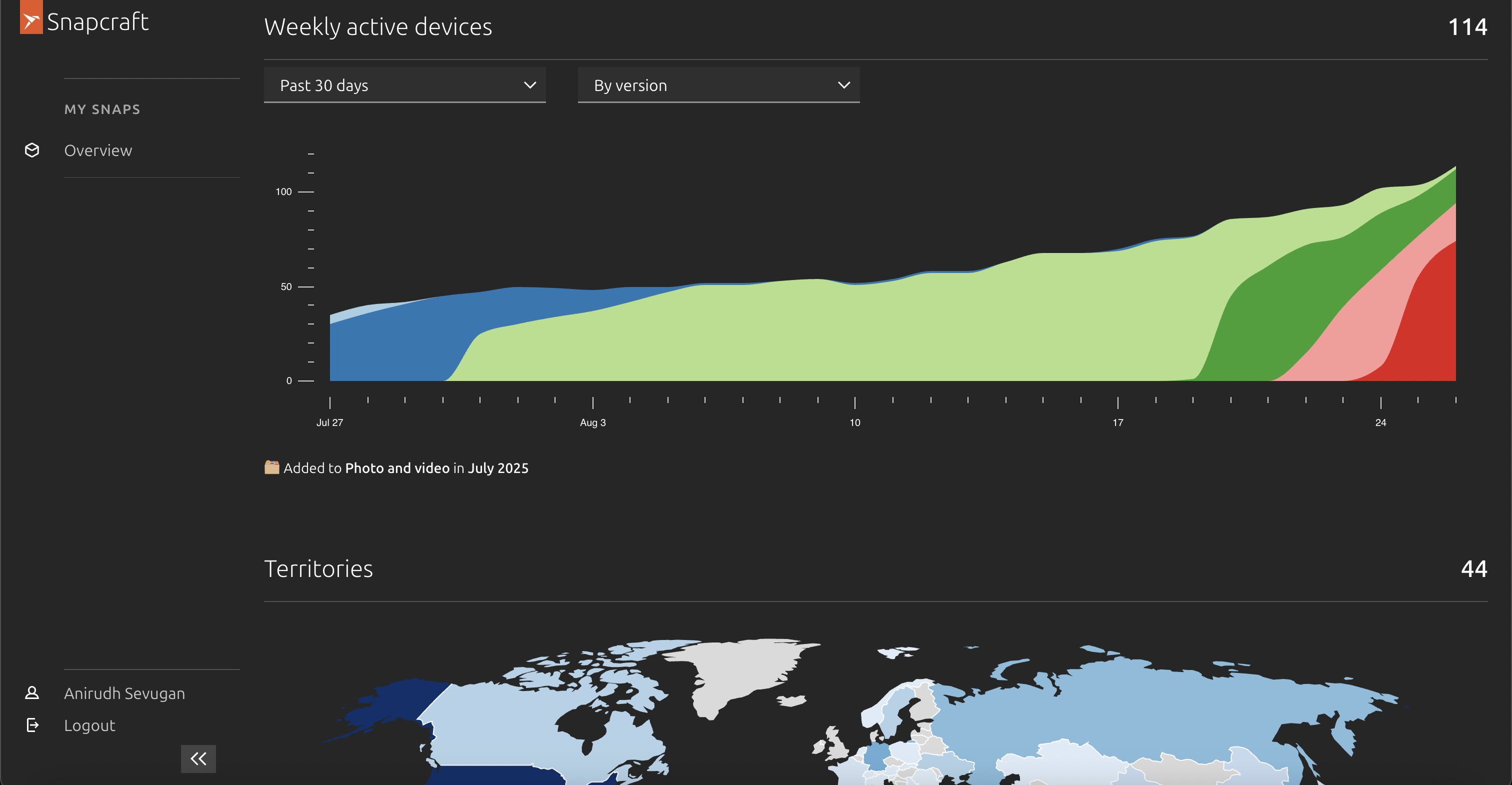
        <content type="html"><![CDATA[<p>SimpliPlay now has more than 100 weekly active users!</p>
<p><img decoding="async" loading="lazy" src="https://simpliplay.netlify.app/docs/img/100-waus.png" alt="Here it is!" class="img_ev3q">
We now have (real) users all across the world!
I've also taken a bit further of a look, and yes, all of these users are real (not bots like last time).
Thanks for your support, guys!</p>
<p>Also, btw, these are analytics from the Snap Store. We don't have tracking inside the app.</p>]]></content>
        <author>
            <name>Anirudh Sevugan</name>
            <uri>https://github.com/A-Star100</uri>
        </author>
        <category label="Milestone" term="Milestone"/>
    </entry>
    <entry>
        <title type="html"><![CDATA[ARM64 Snap!]]></title>
        <id>https://simpliplay.netlify.app/docs/blog/arm64-snap</id>
        <link href="https://simpliplay.netlify.app/docs/blog/arm64-snap"/>
        <updated>2025-08-04T00:00:00.000Z</updated>
        <summary type="html"><![CDATA[SimpliPlay now has an arm64 version available on the Snap Store!]]></summary>
        <content type="html"><![CDATA[<p>SimpliPlay now has an arm64 version available on the Snap Store!</p>
<p>I followed the <a href="https://www.beekeeperstudio.io/blog/electron-apps-for-arm-and-raspberry-pi#electron-builder-and-arm" target="_blank" rel="noopener noreferrer" class="">Beekeeper Studio guide</a> (which was very nice and ad-free by the way) online that gave me one crucial command:</p>
<div class="language-shell codeBlockContainer_Ckt0 theme-code-block" style="--prism-color:#393A34;--prism-background-color:#f6f8fa"><div class="codeBlockContent_QJqH"><pre tabindex="0" class="prism-code language-shell codeBlock_bY9V thin-scrollbar" style="color:#393A34;background-color:#f6f8fa"><code class="codeBlockLines_e6Vv"><div class="token-line" style="color:#393A34"><span class="token plain">SNAPCRAFT_BUILD_ENVIRONMENT=host yarn run electron-builder build --linux snap --arm64 --armv7l</span><br></div></code></pre></div></div>
<p>Since I don't use yarn in my setup (and would rather not try), I changed this to:</p>
<div class="language-shell codeBlockContainer_Ckt0 theme-code-block" style="--prism-color:#393A34;--prism-background-color:#f6f8fa"><div class="codeBlockContent_QJqH"><pre tabindex="0" class="prism-code language-shell codeBlock_bY9V thin-scrollbar" style="color:#393A34;background-color:#f6f8fa"><code class="codeBlockLines_e6Vv"><div class="token-line" style="color:#393A34"><span class="token plain">SNAPCRAFT_BUILD_ENVIRONMENT=host USE_SYSTEM_FPM=true npx electron-builder --linux snap --arm64</span><br></div></code></pre></div></div>
<p>Now, normally this would work. I tried it on an Ubuntu 22.04 ARM GitHub Actions runner, and it seemingly worked.
But when I tested on my VM, it said that a specific version of GLIBC was required, which wasn't installed on the system.</p>
<p>Snaps don't require any libraries to be installed. I tried to use apt to solve the problem but that failed, and the app just silently didn't launch.</p>
<p>When I launched it via the command line, I noticed the problem.
I went back and took a look at the logs while building in CI/CD, and they said the exact same thing, but oddly enough compiled anyway.</p>
<p>I put my thinking hat on and realized that electron-builder uses the <code>core20</code> base by default. In short, bases are for building Snaps with a base of libraries. But, the <code>core20</code> base required an older version of GLIBC that wasn't included with the Ubuntu 22.04 ARM runner, since it needs <code>core22</code>, which would work on Ubuntu 22.04+, which is a substantial portion of my userbase, along with newer versions of non-Ubuntu OSs that supported Snaps.</p>
<p>I (stupidly) tried to use a Ubuntu 20.04 runner (which would work properly with <code>core20</code> and package the GLIBC versions from the system due to the environment variables set to avoid using LXD and multipass to build in a VM, which ARM doesn't properly support even on a real device).</p>
<p>But that didn't exist. So I had to manually set <code>build.snap.base</code> in my <code>package.json</code> to <code>core22</code>, along with using the Ubuntu 22.04 runner instead of 20.04. But then the x64 builds already worked properly with whatever core it was using, so I didn't want to interfere with it.</p>
<p>So I made a new <code>package.json</code> just for ARM64 Linux, named <code>package-arm64-linux.json</code>, which is renamed to <code>package.json</code> while the existing one for non-ARM64 Linux was renamed to <code>package-unused.json</code> at runtime. Other jobs don't do this, so only arm64 Linux will perform this action.</p>
<p>I thought it would work after that, but then installing packages needed for building failed when they were installed during the build process. I was confused, but then realized that manually installing those packages before building may fix it, because building is often sandboxed. I was right after that, and the ARM64 Snap worked successfully on the VM, no issues needed.</p>
<p>It is just it took a few seconds to start, so I thought it failed again till I waited a bit longer :)</p>]]></content>
        <author>
            <name>Anirudh Sevugan</name>
            <uri>https://github.com/A-Star100</uri>
        </author>
        <category label="Milestone" term="Milestone"/>
    </entry>
    <entry>
        <title type="html"><![CDATA[Addons!]]></title>
        <id>https://simpliplay.netlify.app/docs/blog/addons</id>
        <link href="https://simpliplay.netlify.app/docs/blog/addons"/>
        <updated>2025-07-30T00:00:00.000Z</updated>
        <summary type="html"><![CDATA[Anyone can now make addons for SimpliPlay Desktop!]]></summary>
        <content type="html"><![CDATA[<p>Anyone can now make addons for SimpliPlay Desktop!</p>
<p>Addons work on Windows, macOS, and Linux. We are hoping to bring addons functionality to other versions soon, but that will be much tougher (especially with the Android version), so we're mostly only eyeballing it right now.</p>
<p>Take a look at the docs to learn how to make your OWN addon! It's super easy!</p>]]></content>
        <author>
            <name>Anirudh Sevugan</name>
            <uri>https://github.com/A-Star100</uri>
        </author>
        <category label="New" term="New"/>
    </entry>
    <entry>
        <title type="html"><![CDATA[Windows & Linux file picking FINALLY works!!!!!]]></title>
        <id>https://simpliplay.netlify.app/docs/blog/win-file-picking-fixed</id>
        <link href="https://simpliplay.netlify.app/docs/blog/win-file-picking-fixed"/>
        <updated>2025-07-24T00:00:00.000Z</updated>
        <summary type="html"><![CDATA[We finally fixed this bug!]]></summary>
        <content type="html"><![CDATA[<p>We finally fixed this bug!</p>
<p>On Windows, you can't directly choose a file the first time. Try it again a second time and this works. This is to prevent single instance lock-based issues. It should be the same for Linux.</p>
<p>See the video <a href="https://youtu.be/X43YMTMOgfc" target="_blank" rel="noopener noreferrer" class="">here</a>!!!</p>]]></content>
        <author>
            <name>Anirudh Sevugan</name>
            <uri>https://github.com/A-Star100</uri>
        </author>
        <category label="Milestone" term="Milestone"/>
    </entry>
    <entry>
        <title type="html"><![CDATA[Fake and Real]]></title>
        <id>https://simpliplay.netlify.app/docs/blog/fake-and-real</id>
        <link href="https://simpliplay.netlify.app/docs/blog/fake-and-real"/>
        <updated>2025-07-23T00:00:00.000Z</updated>
        <summary type="html"><![CDATA[SimpliPlay didn't really reach 1K downloads, but it did reach something better.]]></summary>
        <content type="html"><![CDATA[<p>SimpliPlay didn't really reach 1K downloads, but it did reach something better.</p>
<p>Those downloads on NPM were (sadly) from bots.
The Snap Store was our hope of real users.
And fortunately, <a href="https://simpliplay.netlify.app/docs/img/snap-store-dls.png" target="_blank" rel="noopener noreferrer" class="">we got some</a>!</p>
<p>From the United States all the way to India, China, Japan, Germany, and Brazil, heck even Egypt,
and <em><strong>much</strong></em> more, we've got some <strong>real</strong> users here!</p>
<p>Thank you so much guys! We appreciate your support, and thanks again for downloading SimpliPlay and spreading the word!</p>]]></content>
        <author>
            <name>Anirudh Sevugan</name>
            <uri>https://github.com/A-Star100</uri>
        </author>
        <category label="Milestone" term="Milestone"/>
    </entry>
    <entry>
        <title type="html"><![CDATA[Snap Store]]></title>
        <id>https://simpliplay.netlify.app/docs/blog/snap-store</id>
        <link href="https://simpliplay.netlify.app/docs/blog/snap-store"/>
        <updated>2025-07-13T00:00:00.000Z</updated>
        <summary type="html"><![CDATA[SimpliPlay is soon to be on the Snap Store, with a few compromises.]]></summary>
        <content type="html"><![CDATA[<p>SimpliPlay is soon to be on the Snap Store, with a few compromises.</p>
<ol>
<li class="">The Snap Store version will only be available on x64. Why? We don't currently have access to the right tools, and CI/CD
builds only work properly for x64. ARM64 builds work, but with several caveats that make the .snap practically unusable.</li>
<li class="">We have an option to compile ARM64 builds, a Raspberry Pi 4 with 4GB of RAM, but it may not work properly so we're just eyeballing it for now.</li>
<li class="">The name request we had to file for the app means it may take a week or two for it to actually go on the Snap Store. Please wait patiently, guys.</li>
</ol>
<p>But don't worry, as soon as we are able to compile ARM64 builds, we'll publish them to the Snap Store as well.
But for now, ARM64 users can still use the AppImages we provide to download the app.
Btw, AppImages are still the recommended way to download the app, as Snap Store builds may not update as fast due to the automatic review
process they need to go through.</p>
<p>Despite these caveats, though, SimpliPlay will still be available on the Snap Store sooner or later.
And as for Flatpaks, we're eyeballing that too.</p>]]></content>
        <author>
            <name>Anirudh Sevugan</name>
            <uri>https://github.com/A-Star100</uri>
        </author>
        <category label="New" term="New"/>
    </entry>
    <entry>
        <title type="html"><![CDATA[ALMOST 1K DOWNLOADS!!!!!]]></title>
        <id>https://simpliplay.netlify.app/docs/blog/almost-1k-downloads</id>
        <link href="https://simpliplay.netlify.app/docs/blog/almost-1k-downloads"/>
        <updated>2025-07-12T00:00:00.000Z</updated>
        <summary type="html"><![CDATA[In just 2 days, we managed to get almost 1K DOWNLOADS!!!!! Thank you all so much for your support!!!!!!]]></summary>
        <content type="html"><![CDATA[<p>In just 2 days, we managed to get almost <a href="https://simpliplay.netlify.app/docs/img/almost-1k.png" target="_blank" rel="noopener noreferrer" class="">1K DOWNLOADS!!!!!</a> Thank you all so much for your support!!!!!!</p>
<p>We also now use CI/CD for SimpliPlay Desktop builds!!!</p>
<p>It's a 2-in-1 milestone! Thank you!!!!!!!! Please share SimpliPlay to your friends and family so more people can enjoy using the app!!!
You can view SimpliPlay on NPM <a href="https://www.npmjs.com/package/simpliplay" target="_blank" rel="noopener noreferrer" class="">here</a>!</p>]]></content>
        <author>
            <name>Anirudh Sevugan</name>
            <uri>https://github.com/A-Star100</uri>
        </author>
        <category label="Milestone" term="Milestone"/>
    </entry>
    <entry>
        <title type="html"><![CDATA[SimpliPlay on NPM]]></title>
        <id>https://simpliplay.netlify.app/docs/blog/simpliplay-npm</id>
        <link href="https://simpliplay.netlify.app/docs/blog/simpliplay-npm"/>
        <updated>2025-07-11T00:00:00.000Z</updated>
        <summary type="html"><![CDATA[SimpliPlay is finally available on a package manager, this time the acclaimed NPM.]]></summary>
        <content type="html"><![CDATA[<p>SimpliPlay is finally available on a package manager, this time the acclaimed <a href="https://www.npmjs.com/" target="_blank" rel="noopener noreferrer" class="">NPM</a>.</p>
<p>You can install its desktop version via:</p>
<div class="language-shell codeBlockContainer_Ckt0 theme-code-block" style="--prism-color:#393A34;--prism-background-color:#f6f8fa"><div class="codeBlockContent_QJqH"><pre tabindex="0" class="prism-code language-shell codeBlock_bY9V thin-scrollbar" style="color:#393A34;background-color:#f6f8fa"><code class="codeBlockLines_e6Vv"><div class="token-line" style="color:#393A34"><span class="token plain">npm install -g simpliplay </span><br></div><div class="token-line" style="color:#393A34"><span class="token plain"># make sure to globally install it, otherwise it will install as a dependency inside your app, which isn't what you want unless you want your app to install SimpliPlay or you want to repurpose the installer</span><br></div></code></pre></div></div>
<p>To update SimpliPlay Desktop, use:</p>
<div class="language-shell codeBlockContainer_Ckt0 theme-code-block" style="--prism-color:#393A34;--prism-background-color:#f6f8fa"><div class="codeBlockContent_QJqH"><pre tabindex="0" class="prism-code language-shell codeBlock_bY9V thin-scrollbar" style="color:#393A34;background-color:#f6f8fa"><code class="codeBlockLines_e6Vv"><div class="token-line" style="color:#393A34"><span class="token plain">simpliplay update</span><br></div></code></pre></div></div>
<p>or:</p>
<div class="language-shell codeBlockContainer_Ckt0 theme-code-block" style="--prism-color:#393A34;--prism-background-color:#f6f8fa"><div class="codeBlockContent_QJqH"><pre tabindex="0" class="prism-code language-shell codeBlock_bY9V thin-scrollbar" style="color:#393A34;background-color:#f6f8fa"><code class="codeBlockLines_e6Vv"><div class="token-line" style="color:#393A34"><span class="token plain">simpliplay start</span><br></div></code></pre></div></div>
<p>after installing the SimpliPlay package. It will always download the latest version of SimpliPlay Desktop, so you won't have to update the installer in most cases.</p>
<p>You can view SimpliPlay on NPM <a href="https://www.npmjs.com/package/simpliplay" target="_blank" rel="noopener noreferrer" class="">here</a>!</p>]]></content>
        <author>
            <name>Anirudh Sevugan</name>
            <uri>https://github.com/A-Star100</uri>
        </author>
        <category label="New" term="New"/>
    </entry>
    <entry>
        <title type="html"><![CDATA[SimpliPlay Xbox]]></title>
        <id>https://simpliplay.netlify.app/docs/blog/simpliplay-xbox</id>
        <link href="https://simpliplay.netlify.app/docs/blog/simpliplay-xbox"/>
        <updated>2025-07-05T00:00:00.000Z</updated>
        <summary type="html"><![CDATA[Now, SimpliPlay is (partially) available for your Xbox console.]]></summary>
        <content type="html"><![CDATA[<p>Now, SimpliPlay is (partially) available for your Xbox console.</p>
<p>With a few friendly fixes, <a href="https://github.com/A-Star100/build-simpliplay-xbox/tree/main" target="_blank" rel="noopener noreferrer" class="">this UWP app</a> will work on your Xbox console.
After hours of troubleshooting, we're asking you a favor. If you can (and want to), please help us port SimpliPlay to Xbox.</p>
<p>If you successfully get it working, congrats! Once you do, please contribute back. We'll give you credit <!-- -->:D</p>]]></content>
        <author>
            <name>Anirudh Sevugan</name>
            <uri>https://github.com/A-Star100</uri>
        </author>
        <category label="New" term="New"/>
    </entry>
    <entry>
        <title type="html"><![CDATA[Legacy version]]></title>
        <id>https://simpliplay.netlify.app/docs/blog/legacy-ver</id>
        <link href="https://simpliplay.netlify.app/docs/blog/legacy-ver"/>
        <updated>2025-06-26T00:00:00.000Z</updated>
        <summary type="html"><![CDATA[Now, SimpliPlay is available on legacy hardware.]]></summary>
        <content type="html"><![CDATA[<p>Now, SimpliPlay is available on legacy hardware.</p>
<p>Only for emergency use, is the legacy version of SimpliPlay. It is simply the legacy version of NW.js that supports Windows XP and macOS 10.6 with the web app of SimpliPlay inside, certain features removed to remain compatible with this old version of NW.js.</p>
<p>This might sound like a stupid decision, but remember this?</p>
<p><em>The mission to make media playback simple, <strong>anywhere, anytime</strong></em>.</p>
<p>The <em>anywhere, anytime</em> part is the focus. If the app only supports such new hardware on desktop, not everyone can play media. Some people don't even have functional web browsers anymore.</p>
<p>Of course, for those of you on mobile, you don't need to worry about this. The Android version supports Android 2.1 and up (though we forced it to support a minimum of Android 5 to align with Google Play rules and for the best experience), and the iOS version, well it will be hard to do anything about that. :)</p>
<p>You may download it <a href="https://simpliplay.netlify.app/legacy" target="_blank" rel="noopener noreferrer" class="">here</a>.</p>]]></content>
        <author>
            <name>Anirudh Sevugan</name>
            <uri>https://github.com/A-Star100</uri>
        </author>
        <category label="New" term="New"/>
    </entry>
</feed>